



Artificial intelligence continues to reshape how we interact with technology, and one of the most significant developments comes from Microsoft, which is reportedly testing a new password syncing feature integrated with the web through its AI assistant, Microsoft Copilot.
This experimental feature could fundamentally change how users manage their passwords across devices, websites, and applications. By combining AI assistance with secure password storage and web integration, Microsoft aims to create a seamless and intelligent system that simplifies authentication while strengthening security.
The move reflects Microsoft’s broader strategy of embedding AI deeply into its ecosystem—from Windows 11 to Microsoft Edge and Microsoft 365—turning Copilot into a central hub for productivity, automation, and digital identity management.
In this article, we will explore:
-
What the Copilot password syncing feature is
-
How web integration works
-
Why Microsoft is investing in AI-driven security tools
-
Potential benefits for users and businesses
-
Privacy and cybersecurity implications
-
How it compares with competitors
-
What the future of passwordless authentication might look like
The Rise of Microsoft Copilot as an AI Platform
Since its launch, Microsoft Copilot has evolved rapidly from a simple AI assistant into a powerful productivity platform.
Originally introduced within Microsoft 365 apps, Copilot has expanded into multiple products including:
-
Windows
-
Edge browser
-
Office tools
-
Developer platforms
-
Enterprise software
Today, Copilot functions as an AI-powered layer across Microsoft’s ecosystem, helping users write documents, generate code, summarize content, and automate tasks.
Now Microsoft appears to be taking things further by integrating credential management and web authentication directly into Copilot.
If implemented widely, the assistant could soon handle tasks like:
-
Retrieving saved passwords
-
Logging users into websites
-
Suggesting stronger passwords
-
Managing authentication across devices
This could make Copilot not only a productivity assistant but also a digital identity manager.
What Is the New Password Syncing Feature?
The feature currently being tested enables Copilot to access and sync passwords stored within Microsoft’s ecosystem and use them during web interactions.
Instead of manually typing passwords or opening password managers, users may soon be able to simply ask Copilot to handle authentication.
Example Use Case
Imagine saying:
“Copilot, log me into my banking website.”
The AI assistant could:
-
Recognize the website
-
Retrieve the stored credentials
-
Autofill the login securely
-
Authenticate the user
All while maintaining encryption and security protections.
This feature reportedly connects password data stored in the Microsoft account and Edge browser, allowing Copilot to retrieve credentials in real time.
How Web Integration Works
The key innovation in this feature is web integration.
Traditionally, password managers operate within browsers or apps. But with Copilot integration, authentication could become AI-driven and conversational.
Here is how the system may function.
Step 1: Password Storage
Passwords are securely stored within Microsoft’s encrypted password manager, often through:
-
Microsoft Edge
-
Microsoft Account
-
Windows credential manager
Step 2: Cloud Sync
Credentials are synced across devices connected to the same Microsoft account.
Step 3: AI Access Layer
Copilot receives controlled access to these credentials, allowing it to assist users in retrieving or applying them.
Step 4: Web Interaction
When users open a website or request login help, Copilot can:
-
Detect the site
-
Suggest stored credentials
-
Autofill login fields
-
Generate new passwords if needed
This process blends AI automation with secure credential management.
Why Microsoft Is Building AI Password Management
Cybersecurity threats are increasing rapidly. Millions of accounts are compromised every year due to weak or reused passwords.
Microsoft’s AI-driven approach aims to solve three major problems.
1. Password Fatigue
Users manage dozens—or even hundreds—of accounts.
Many people:
-
reuse passwords
-
forget credentials
-
rely on weak combinations
AI assistants like Copilot could simplify this by automating credential management.
2. Security Risks
Poor password habits contribute to data breaches.
AI could help by:
-
generating strong passwords
-
warning about compromised credentials
-
recommending password updates
3. User Experience
Logging into services repeatedly can be frustrating.
AI-assisted login could make authentication fast, automatic, and intuitive.
Integration With Microsoft Edge
A major part of this feature is its connection with Microsoft Edge, Microsoft’s Chromium-based browser.
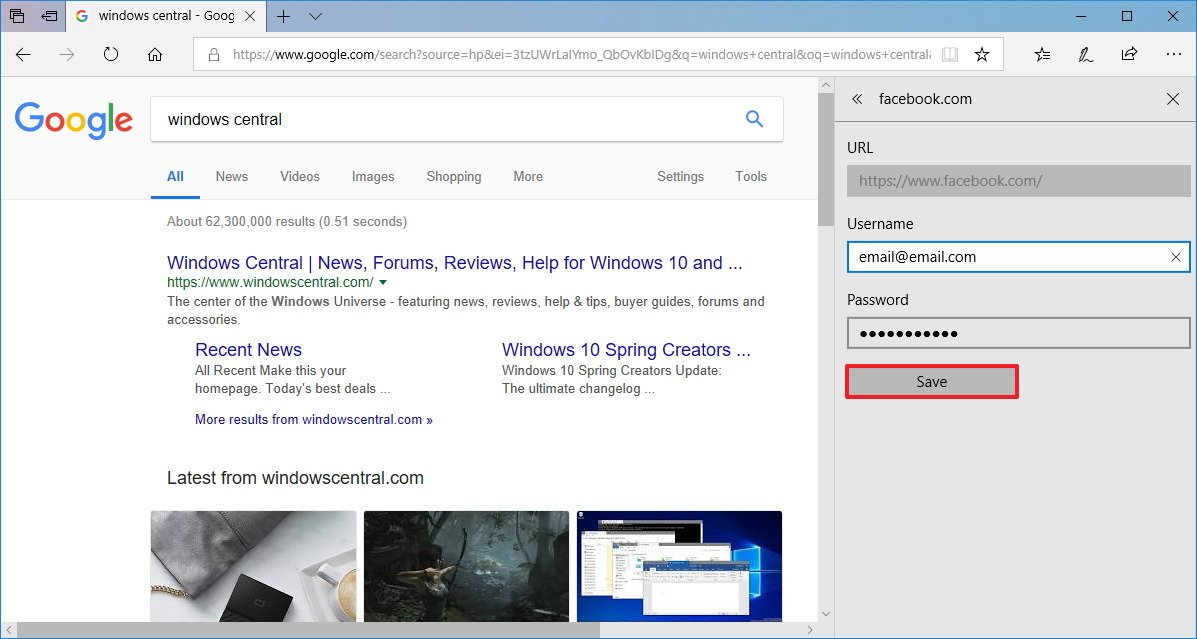
Edge already includes a built-in password manager that allows users to:
-
Save credentials
-
Generate passwords
-
Sync across devices
-
Autofill forms
By connecting this system with Copilot, Microsoft could turn the browser into a fully AI-assisted authentication environment.
For example:
-
Copilot might alert users about compromised passwords.
-
It could recommend updates for weak credentials.
-
It could automatically log users into saved accounts.
This would bring AI assistance directly into browsing workflows.
Competing With Google and Apple
Microsoft’s move places it in direct competition with other major tech companies working on password management.
Google already offers:
-
Google Password Manager
-
Automatic password generation
-
Security alerts for compromised passwords
These features are integrated with Google Chrome and Android devices.
Apple
Apple provides its own system through:
-
iCloud Keychain
-
Face ID authentication
-
Passkeys
Apple has strongly pushed toward passwordless authentication.
Microsoft’s Advantage
Microsoft’s Copilot integration introduces a new dimension: conversational AI assistance.
Instead of navigating settings or password managers manually, users could simply ask the AI for help.
This could significantly simplify digital security management.
The Push Toward Passkeys and Passwordless Login
The long-term goal of the tech industry is eliminating passwords entirely.
Companies including Microsoft, Apple, and Google support passkeys, a new authentication method based on cryptographic keys.
Passkeys offer several advantages:
-
No passwords to remember
-
Protection against phishing
-
Strong encryption
Microsoft already supports passkeys across its services.
Copilot could eventually act as a passkey manager, helping users authenticate through biometrics or device verification instead of passwords.
Security and Privacy Concerns
Whenever AI handles sensitive data, security concerns naturally arise.
Users may worry about:
-
AI accessing personal credentials
-
Cloud storage vulnerabilities
-
Unauthorized access
Microsoft has emphasized that password data remains encrypted and protected, even when integrated with Copilot.
Key security measures likely include:
-
end-to-end encryption
-
multi-factor authentication
-
device verification
-
biometric login
The AI itself does not “see” raw passwords but operates through secure credential frameworks.
Enterprise Implications
Businesses could benefit significantly from AI-assisted credential management.
Many organizations struggle with:
-
password resets
-
security compliance
-
credential sprawl
Copilot integration could help enterprise users by:
-
automating authentication workflows
-
recommending stronger password policies
-
monitoring credential security
Companies using Microsoft Azure and Microsoft Entra ID could see improved identity management through AI-driven tools.
Potential Future Features
The password syncing test could lead to many advanced capabilities.
Experts predict that future Copilot features might include:
AI Login Automation
Copilot could automatically log users into frequently used services.
Security Monitoring
AI could scan for compromised accounts and recommend actions.
Cross-Platform Identity Management
Users may manage credentials across apps, websites, and devices through a single assistant.
Voice Authentication
Future systems could support voice-based identity verification.
The Role of AI in Cybersecurity
Cybersecurity increasingly relies on artificial intelligence.
AI helps detect:
-
unusual login patterns
-
phishing attempts
-
malware behavior
Microsoft already uses AI across its security ecosystem, including:
-
threat detection
-
identity protection
-
cloud monitoring
Copilot integration could bring these capabilities directly to everyday users.
How This Could Transform Everyday Internet Use
If widely adopted, Copilot’s password syncing feature could change the way people interact with the internet.
Users may no longer think about passwords as something they must remember.
Instead, authentication could become AI-assisted and automated.
Possible daily scenarios:
-
Copilot logs you into shopping websites.
-
The AI reminds you to change weak passwords.
-
It suggests safer login methods like passkeys.
Over time, digital identity could become managed entirely through intelligent assistants.
Early Testing and Rollout
Microsoft has not yet announced a full release timeline.
However, experimental features often appear first in:
-
Windows Insider builds
-
Edge Canary releases
-
Microsoft developer previews
Testing allows Microsoft to evaluate:
-
security risks
-
user experience
-
system performance
If successful, the feature could eventually reach millions of users.
What This Means for the Future of AI Assistants
The integration of password management into Copilot signals a broader shift.
AI assistants are moving beyond simple tasks like writing emails or summarizing documents.
They are becoming central digital companions that manage online identities, workflows, and security.
This transformation may redefine how humans interact with technology.
Instead of navigating menus or remembering passwords, users could rely on AI-driven systems that understand context and act automatically.
Conclusion
Microsoft’s test of password syncing with web integration in Copilot represents a significant step toward a more intelligent and secure digital future.
By combining AI assistance with credential management, Microsoft aims to simplify authentication while improving cybersecurity.
The feature could:
-
eliminate password fatigue
-
enhance online safety
-
streamline login experiences
-
move users toward passwordless authentication
As competition intensifies between Microsoft, Apple, and Google in the identity and security space, innovations like this could shape the next generation of digital ecosystems.
If Copilot successfully evolves into an AI-powered identity manager, it may soon become one of the most important tools for navigating the modern internet.